Compatible CPU for Motherboard – Find the Right Match in 2026
To find a compatible CPU for your motherboard, match the CPU brand, socket type, chipset, and generation. Always check the motherboard’s official CPU support list and ensure BIOS updates if needed. This prevents damage and guarantees proper PC performance.
Choosing a compatible CPU for your motherboard is critical for a smooth PC experience. The CPU is your computer’s brain, while the motherboard is its foundation. If they don’t match, your PC won’t start, or you may damage the components. The key is checking CPU brand, socket type, chipset, and generation, plus BIOS support. Beginners often get confused with Intel and AMD options, different socket formats, and chipset differences. This guide will simplify everything, showing you step-by-step how to identify compatible CPUs, avoid mistakes, and build or upgrade your PC confidently in 2025.
Why CPU and Motherboard Compatibility Matters
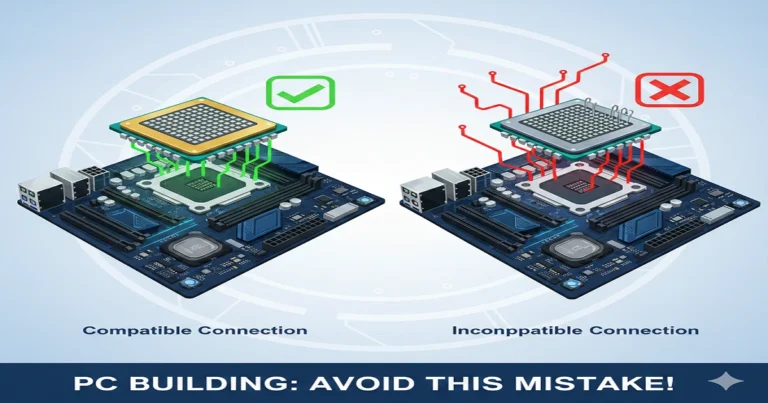
The CPU handles all your computer’s tasks, while the motherboard connects all hardware, from RAM to GPU to storage. If these components are incompatible, your PC may not boot, or worse, you could damage your CPU. Think of it like plugging a European plug into a US socket — it simply won’t fit, and forcing it can be dangerous.
Ensuring compatibility guarantees:
- Stable PC operation
- Maximum performance
- Safe installation without hardware damage
Motherboards Explained – TechQuills
Key Factors for Compatibility
CPU Brand
Motherboards are designed specifically for Intel or AMD CPUs. You cannot install an Intel CPU on an AMD motherboard and vice versa. Always match the brand first.
Example:
- Intel Core i5 → Intel motherboard
- AMD Ryzen 5 → AMD motherboard
Intel vs AMD CPUs – TechQuills
Socket Type
The CPU socket is the physical connection point on the motherboard. Each socket supports specific CPU generations.
LGA vs PGA
- LGA (Land Grid Array): Pins on motherboard (Intel)
- PGA (Pin Grid Array): Pins on CPU (AMD until AM5)
Popular Sockets 2025:
- Intel: LGA 1200, LGA 1700, LGA 1851
- AMD: AM4 (PGA), AM5 (LGA)
CPU Generation
Motherboards often support multiple CPU generations, but not all.
- AMD AM4 → Ryzen 3000, 4000, 5000
- Intel LGA 1700 → 12th, 13th, 14th Gen
Check your motherboard’s CPU support list for exact generations.
Chipset
Chipsets manage communication between the CPU and other components. They determine:
- Overclocking
- PCIe lanes for GPU
- RAM type and speed
Intel chipsets: B, H, Z series
AMD chipsets: A, B, X series
Higher-end chipsets (Z/X) support overclocking and high-speed memory.
Best Motherboard Chipsets for Gaming – TechQuills
How to Check Compatibility (Step-by-Step)
- Identify CPU Brand and Generation
- Check Motherboard Socket
- Check Motherboard Chipset
- Verify on Manufacturer’s Website
Pro Tip: Always confirm the minimum BIOS version for CPU support.
Common Tools and Resources
- PCPartPicker: Ensures no incompatibility
- Manufacturer CPU Finder: ASUS, MSI, Gigabyte, ASRock
- BIOS Update Page: Check motherboard updates
How to Update BIOS – TechQuills
Real-Life Examples
AMD Build Example
- CPU: Ryzen 5 5600
- Compatible Motherboard: B450, B550, X570
- Tip: Update BIOS if using an older B450 board
Intel Build Example
- CPU: Intel Core i7 12700
- Compatible Motherboard: LGA 1700 socket, Z690, B660, H670
- Tip: The Z series allows overclocking, B series is budget-friendly
CPU Compatibility Checklist
| Factor | What to Check | Example |
| Brand | Intel or AMD | Ryzen 5 → AMD |
| Socket | LGA/PGA, exact model | LGA 1700 |
| CPU Generation | Supported generations | 12th/13th Gen Intel |
| Chipset | Supports CPU features | Z690, B660, X570 |
| BIOS Version | Minimum BIOS required for the CPU | Update if older board |
| RAM Support | DDR4 or DDR5 compatibility | DDR4-3600 MHz |
| PCIe Version | GPU or NVMe SSD support | PCIe 4.0 |
Troubleshooting Common Issues
- CPU won’t fit: Check socket type
- PC won’t boot: Check CPU generation + BIOS update.
- Error beeps: Refer to the motherboard manual.
- Incompatible warning: Use the manufacturer’s CPU finder tool
FAQs
Q1: Can I mix CPU brands?
A: No. Intel CPUs only work with Intel motherboards, and AMD CPUs with AMD motherboards.
Q2: Can a CPU work with older chipsets?
A: Sometimes, but a BIOS update may be required.
Q3: How do I know if BIOS needs updating?
A: Manufacturer lists the minimum BIOS for each CPU.
Q4: What if the socket matches but the chipset doesn’t?
A: CPU may not work or features may be limited.
Q5: How to choose a motherboard for a new CPU?
A: Match socket → check chipset → confirm support list → buy.
Conclusion:
Finding a compatible CPU for your motherboard is essential for a safe, reliable, and high-performance PC build. Always check CPU brand, socket type, chipset, and generation. Use the manufacturer’s CPU support lists and update the BIOS if required. Beginners can use PCPartPicker or manufacturer tools to avoid mistakes. With the right match, your PC will boot correctly, perform optimally, and remain upgrade-ready for future generations. Understanding compatibility saves money, time, and prevents hardware damage. Follow this guide step-by-step, and you can confidently choose the right CPU and motherboard combination for gaming, streaming, or productivity in 2025.